Product
Passwords for VS Code Is Live
July 4, 2026 · 4 min read
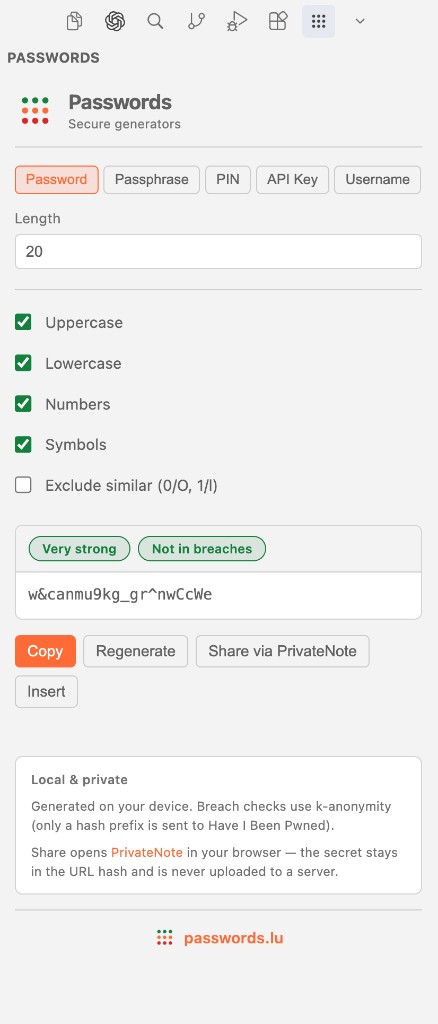
If you generate secrets while coding, switching to a browser tab breaks flow. The Passwords extension for VS Code brings the same privacy-first generation from passwords.lu into your editor — with a sidebar panel, command palette shortcuts, and optional breach checks.
What you get
- Sidebar panel for passwords, passphrases, PINs, API keys, and usernames
- Auto-generate on load and when options change, with Copy as the primary action
- Local zxcvbn strength badges — no network required
- Optional Have I Been Pwned lookup via k-anonymity after generating passwords and passphrases
- Share via PrivateNote when you need to hand a secret to someone else
- Command palette commands to generate, copy, and analyze selected text or the clipboard
Built for developers who care about privacy
Generation and strength analysis run entirely on your machine. When breach checking is enabled, only the first five characters of a SHA-1 hash are sent to Have I Been Pwned — the same k-anonymity model used on the passwords.lu breach test page.
Randomness comes from Node crypto with rejection sampling, matching the approach we use across the site generators.
Install and go
Search for Passwords in the VS Code Marketplace or run: code --install-extension passwordslu.passwords-lu-generator
Open the Passwords icon in the Activity Bar, pick a type, and copy or insert the result. For the full command list, settings, and privacy notes, see the developers page.
Try it in VS Code
Install from the Marketplace or read the full reference on the developers page.