Product
Passwords for Chrome Is Live
July 17, 2026 · 4 min read
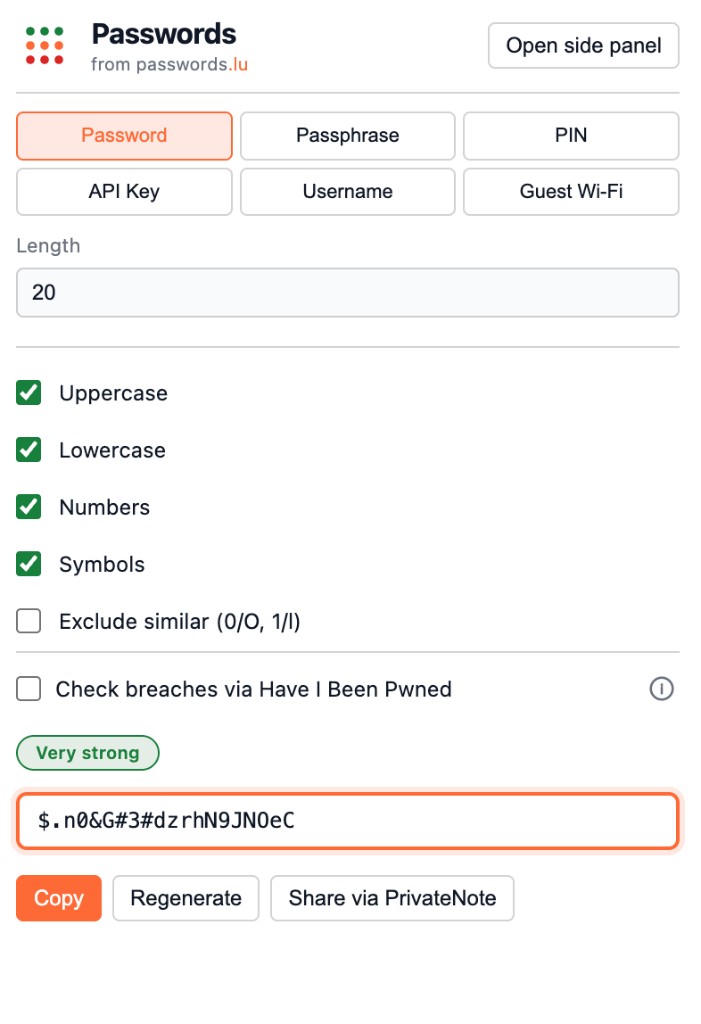
Opening passwords.lu in another tab works — until you are already mid-task in Chrome and just need a strong secret, a guest Wi‑Fi QR, or a quick breach check on selected text. The Passwords extension puts the same privacy-first tools in the toolbar and side panel.
What you get
- Toolbar popup and side panel for passwords, passphrases, PINs, API keys, and usernames
- Guest Wi‑Fi card: memorable passphrase plus a downloadable WIFI QR PNG for visitors
- One-click copy, with optional PrivateNote sharing for secrets you need to hand off
- Local strength scoring — zxcvbn for passwords and passphrases, plus PIN-specific checks
- Optional Have I Been Pwned lookup via k-anonymity (hash prefix only)
- Context menu on any page: check selected text for strength or breaches
- UI follows Chrome’s language (English, French, German, Spanish, Portuguese, Italian)
Built for privacy, not another vault
This is a generator and checker — not a password manager. Secrets are created on your device with the Web Crypto API. Strength analysis stays offline. When breach checking is on, only the first five characters of a SHA-1 hash go to Have I Been Pwned — the same k-anonymity model as the passwords.lu breach test.
We do not store generated secrets or require an account. Share opens PrivateNote in a new tab with the secret in the URL hash fragment, not in server logs.
Install and go
Add Passwords from the Chrome Web Store, then click the toolbar icon. Use the popup for a quick generate-and-copy, or open the side panel when you want more space. For Wi‑Fi guests, fill in the SSID, download the QR, and leave the passphrase printable or shared separately.
Full install notes, feature walkthrough, and the matching VS Code extension live on the developers page.
Try it in Chrome
Install from the Chrome Web Store or read the full developers reference.